Made New Friends in SocialSpark

Posted by Daniel Chew On June - 25 - 2008

It’s been like a month since I joined SocialSpark and I must say I am really impressed with all the ongoings and stuffs. Though one thing I lacked though is not doing any available opportunities in SocialSpark yet. Maybe this is the first one though.

Okay, for those clueless on what SocialSpark actually is, it’s a social networking site where one can also monetize their blogs, build community and drive traffic. It’s that simple really. Register and get ready to earn money and build up your network.

You must have wondered though, “But but but… Google’s going to penalized if we do sponsored post.”

Well, have no fear, one good thing about SocialSpark is that the links come with a nofollow tag. Now that’s one good news for those concern about their Page Rank.

As mentioned in their code of ethics, you have the answers to your everyday earnings.
-100% Audit-able In-Post Disclosure
-100% Transparency
-100% Real Opinions
-100% Search Engine Friendly

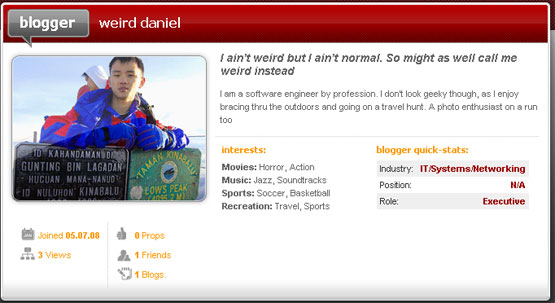
Well, the most though is I get to make new friends, which I don’t know exist. Well, other people from other parts of the world too. Here’s a sample screenshot of how the friend request goes…

Friend Request SocialSpark

Kinda simple to understand. Anyway here’s another note, who else has an account in SocialSpark, do add me. It’ll be easier to stay connected too. Unlike other social networking sites too, I can even add prop for a socialsparker and even get propped by them. This enhances creditability and your standing in the SocialSpark network.

Oh yeah, forgot to mention, Advertisers are also welcomed to take part in SocialSpark, well, without advertisers there wouldn’t be bloggers at all right. Without bloggers there wouldn’t be advertisers too. I am glad that SocialSpark realized the importance of creating a medium for advertisers to advertise their advertisements using the blog method. In this age and time, going online is the sure bet.

Well, I am going to explore more stuffs first. Oh ya, you can look for me though, my name is Weird Daniel in SocialSpark. Hehehehe….

Sponsored by SocialSpark

Popularity: 2% [?]

Social Spark Networking

Posted by Daniel Chew On May - 11 - 2008

There is a new site which I would like to introduce. Yes, heard of Social Spark?? Well, a funny thing is I have joined this community website and it’s good to know that I have also created my profile there. Haha.. seeing how people has always called me weird, I decided to get a profile there with the name Weird Daniel.

Just only a few days after joining Social Spark, I find that it’s really a good place to link together with other bloggers looking to advertise their site and give comments for each other blogs. Well, though I am still clueless as to how to add a friend.

But then all this really need practice as how I was very noob in joining Facebook previously. Well, so far the only functionality for SocialSpark for me now is to get to know the IZEA community more. I can now connect to other bloggers using SocialSpark just by adding a friend, sending comments and giving reviews about other blogs featured there.

Also not forgetting, one can even get paid for doing paid postings. There’s also the nofollow clause in there, so with this, it’ll never affect your page rank. Now that’s really a two thumbs up from me. No more setbacks for page ranking and still get to earn. What more can one ask?

Though I wished that there was a better faq than the current one. What the heck is a blog archive when I joined. I tried searching and was lost.

This post sponsored by SocialSpark

Popularity: 3% [?]

CHEAP DEAL

Seoul hotels

VIDEO

TAG

About Me

Daniel Chew

Hello there. My name is Daniel Chew or known in the blogosphere as DanielCtw.

Well, I love to take photos and to write things so that you guys/gals will enjoy.the life stories here. I travel a lot and that's why this blog's a travel log and sometimes personal stories thrown into it. Wanna know more about me? Do read more about me at the ABOUT ME PAGE!

Twitter

    Photos

    Activate the Flickrss plugin to see the image thumbnails!